Bunger Bunger
Amazon.in12 Oct 2024
Quality Compact ATX Case with Few Compromises Quality Compact ATX Case with Few Compromises
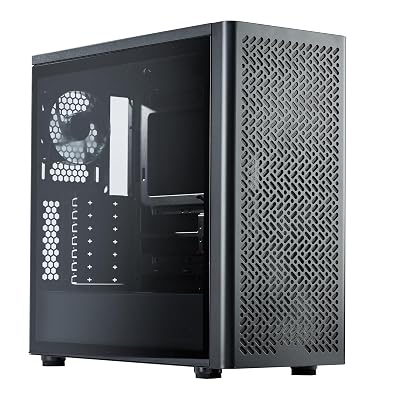
Mechanic Master's C34 Pro manages to cram larger PC components into a relatively compact chassis. Overall build quality is solid. The silver and black color variant that I chose looks quite sharp and there are other color variants on offer which I appreciate. My unit was packaged well and came in pristine condition. Case accessories include a box containing all the necessary screws, a filter for the rear exhaust fan, a handy screwdriver, and an optional handle if you want to easily carry the case. The box for screws was quite handy and I used the included screwdriver when I built with the case. I do not like tempered glass so I instead opted to purchase a solid ventilated panel from Mechanic Master's Newegg store which came just fine and was an easy replacement. The chassis is quite sturdy. The only minor nitpick I can say with quality is that a 2-3 screws were over-tightened, but I have no other complaints when it comes to build quality. The C34 Pro has several supported layouts for how you want to lay out components. There are several mounting options for the power supply. If you have an ATX power supply, you can mount it on the bottom or top of the case. If you have an SFX PSU, it is possible to mount it to the side bracket although I do not have an SFX power supply to try this method. I originally mounted my 160 mm long ATX power supply on the bottom, but I top-mounted it as my graphics card was almost butting up against my PSU. The case can accommodate longer PSUs although from my experience you will want to opt for something compact. Do note that where you mount your PSU and the size of your PSU will determine the length of your graphics card although this case can house larger graphics cards. My 322 mm long 4080 Ventus 3X OC fits just fine with either orientation. There are brackets on the back of the case that house the PCIE slots and the power plug. You can unscrew these brackets to help clear up some space to install a large graphics card, or shift the slots up if you decided to go for an M-ATX build which is pretty neat. There is also a graphics card holder installed although I unscrewed it and instead opted to use the one that came with my GPU. Despite being 30.7 liters in volume, the case can house quite a lot of cooling. For some reason, Mechanic Master doesn't list that the case is compatible with 140 mm fans. Two can fit on the top and bottom and possibly one on the front of the case. Mechanic Master lists the CPU cooler clearance at 165mm which is accurate as my 160mm high AK620 is almost at the side panel. The case seems to be well ventilated as there are perforations on the front, top, bottom, side, and rear of the case. There are numerous 120mm and 140mm mounts on these perforations allowing for good airflow. Up to 3/120mm fans at the top and bottom, 2/140mm fans top and bottom, 2/120mm fans on the side and 1/120mm fan at the rear. My previous case was a Cooler Master Qube 500 Flatpack which was a hot box. The C34 Pro is a cooler and quieter case. CPU temps range from the 40s to mid 60s depending on the task and my GPU goes from the 40s to low 70s depending on the title. I can run the case fans at low RPMs while my loudest component is my GPU. Although the C34 Pro is a compact case, the case does not compromise on storage. There is a mount for 2/2.5inch drives behind the case which is held by a thumbscrew. Another 2.5inch drive can also be housed behind the cable cover. However, if you want to mount a drive here, I suggest taking the cable cover out of the case, screwing the drive on, attaching the necessary cables to it, and then screwing the cover back into the case. If you opt for a long power supply, it can go right up behind the cable cover which would leave little room for a drive there. There are also options for 3.5 inch drives. A 3.5 inch drive can be mounted to the bottom and side of the case. There is also an extended hard drive bracket that can be positioned at various points along the side bracket. My case came with one bracket although they should be available for purchase should you require more. This case has a lot going for it, but there are some caveats. Mounting fans to the top and bottom of the case can be quite a chore since several panels need to be removed. Additionally, two case feet need to be unscrewed in order to get the best access to the bottom fans. I genuinely wish the top and bottom fan brackets could easily be removable so I would not have to unscrew multiple panels. For some reason, the side bracket is not removable. The side bracket is connected to the back portion of the chassis yet there are several screws housing it in place. If it could be removed from the case, it would make mounting components there easier. Cable management is mostly good, the top portion of the case has generous space for fans and the cables running to the CPU. There are also several tie down points from which to add straps. However, be prepared for a mess of cables from your PSU
- Durability
- Build quality
- Ease of use
- After-sales service