
Abhijit Ghosh
Amazon.in28 Jul 2018
Absurdly priced
1 star for overinflated pricing. The product should be around 19k even with import fees added. Read more Read less

Out of stock · 6-month warranty
We may earn a commission when you buy through these links. It never changes the price or the order.
DudScore
Mixed signals. Compare before you buy.
Early score: few reviewsThe price has hardly moved yet, so there is nothing to place today's on.
From 229 days of our own price history, across stores.
₹53,717
Out of stock at our last check
The nearest alternatives in this category and price range.
 Fancyleds HDMI 2.1 Fancy Sync Box Streaming Media Player Syncing Device; 4K 120Hz, HDR, Movies Supported (for 55" to 65" TVs)₹43,599₹10,118 cheaper
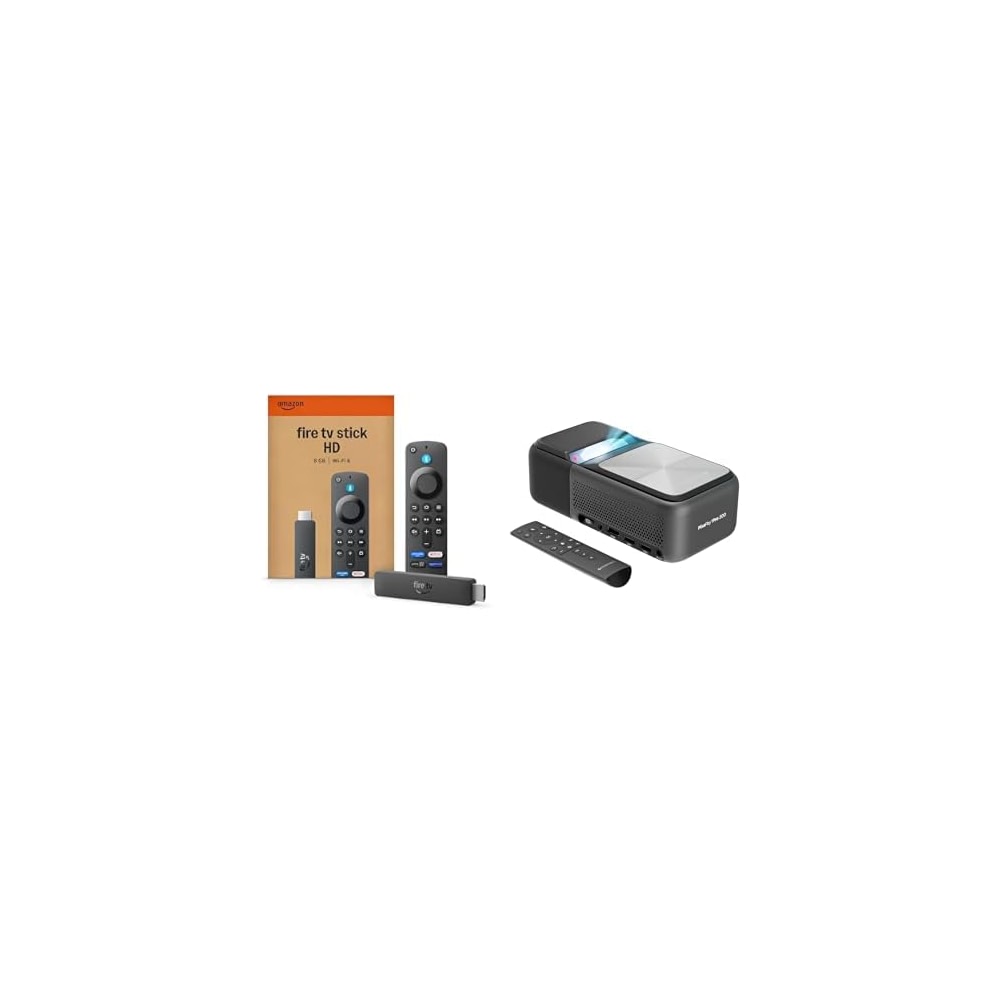 Saver combo of ZEBRONICS PIXAPLAY PRO 500 Ultra Short Throw Projector and Amazon Fire TV Stick HD newest model₹47,198₹6,519 cheaper
Ratings on stores (5,810)Reviews on Whydud (13)
Customer rating
4.5out of 5
5,810 ratings across stores
| 5★ | 77% | |
|---|---|---|
| 4★ | 12% | |
| 3★ | 4% | |
| 2★ | 2% | |
| 1★ | 5% |
77% verified purchases
Abhijit Ghosh
Amazon.in28 Jul 2018
1 star for overinflated pricing. The product should be around 19k even with import fees added. Read more Read less
Sandeep
Amazon.in18 Apr 2018
Why so costly? It should be less than 20k. Read more Read less
Dr syam babu
Amazon.in17 May 2020
How to charge the remote Read more Read less
P. Pochu
Amazon.in30 May 2018
This is the best Android TV in the market. USB sticks like Chromecast offer similar features but are dependent on your phone. But this is completely Independent and does not need any app support to run. For example Amazon Prime does not run on Chromecast because Amazon has not added support to Chromecast. But it works with Android TV as it's an Android device and Prime video is available as an App in the app store. So basically any app in the app store can be installed on this and you can also use it as a Plex server. Read more Read less
barun g.
Amazon.in29 Oct 2019
This is real beast.All other products are way behind.The performance compelled me to write reviews for the first time. Read more Read less
Placeholder
Amazon.in16 Dec 2017
It is best gaming console I have a saw in my life I have 2 of these. Read more Read less
AJAY MARWAHA
Amazon.in16 Nov 2017
No doubt about its performance. Read more Read less
Primetime
Amazon.in31 Jan 2018
This was the second Shield Tv I bought and I love these boxes. I use the old one as my main living room device and I'm so glad I spent the money. I tried crappy android boxes that cost nearly as much and they all needed mice or air pointers and just seemed slapped together. The Shield was easily accessible from the beginning and has only become a better device with every update. Best box for netflix and Kodi and the addition of Plex doesn't hurt either, it adds a lot of functionality and more with each update. The Youtube app is okay. It was better a few updates back but Youtube seems to be trying to bring all their apps into the same design setup and that kinda ruined the Shield's app but it still works. The gaming side isn't perfect but when it works it is brilliant. I am able to play most of my PC games from my couch on a big TV with little lag and any controller I feel like. I don't do much android gaming but it seems to work well for that too. Only problem I have with it is it gives me too much access to content and I tend to waste a lot of time watching tv... Read more Read less
Joshua
Amazon.in6 Apr 2019
I've used streaming devices for some time now. First it was the Roku LT, which at the time (before smart speakers and such were common)...I loved. It played everything, and did so fairly well. Then the Chromecast came out, and it was neat because I could control everything from my phone, and I could set it up so guests could as well...but was limited to the fact that I HAD to have my phone for it to do anything. Ended up eventually getting a Roku 3 to replace this. Some time after getting the above, smart speakers came out, and we ended up going the Alexa route...so we got FireTVs to replace the above devices. Now I could talk to my house to control my TV, yay! Of course, this came at the severe downside of not being able to stream YouTube or anything from the Play store, because Amazon and Google can't manage to get along (big companies can be stupid sometimes). Experimenting with this, I purchased one of these to combine the features I was looking for in all of the above...the 'play everything' from the Roku, the 'cast from your phone' from the Chromecast, and the 'tell my house to play the show' from the FireTV...and this device did all of the above...as well as replacing my Steam Link...and while adding a source for cloud game streaming as well. (In short, I got one of these to replace a streaming device, and instead replaced two devices and added functionality I didn't realize I was missing.) On top of that, this plays everything faster (no waiting ages for the CW app to load like on the FireTV or Roku, for example), and easily links up to other remotes for extra control options (for example, I hooked up the controller for my Steam Link to this, as well as the remote for the FireTV it replaced, so both my wife and I could have our own remotes). After using it for a short while...I loved it so much that I bought another (for the other room). Now, some details: The Good: This thing streams like a champ. Every streaming app loads and runs faster than on any other device I've owned. Casts like a charm. Gets around the Amazon/Google fight (because they can't just get along) Both the remote and controller have this neat little trick in putting volume control on via a smart slider. The Neutral: Hulu app for this is shitty (but that's really on Hulu, so I can't hold it against NVidia). Hulu casting from your phone works great, however. Controller needs to be charged fairly often (like once every 3-4 days) The Bad: Remote, while very cool in what it does, has garbage battery life. Now, all that said, if you're looking at buying one of these....I'd weigh that against how quickly you want one. If you need one in the next month or six months...absolutely get one. It's worth every penny. If you can wait a bit, I'd hold off for now...there's a possibility that they're going to announce a 2019 version soon, which might be better still (or at least should make this one cost less). Read more Read less
Valsa Ashwin Kumar
Amazon.in7 Mar 2020
best streaming device Read more Read less
S. Sen
Amazon.in22 Feb 2017
This is by far the best Android TV on the market. I'll focus entirely on functionality as you can check out unboxing, hardware specs etc. online. Netflix, YouTube, Amazon Video etc. all come pre-loaded. Most importantly, you can load Network-Attached Storage (NAS) devices. Since all my content is stored on a NAS, this was important to me. Second, it can load Kodi. You can install additional plugins (like Exodus) on Kodi as well. The device is adequately powered for apps like Netflix as well as Kodi. It is responsive and not sluggish, unlike a lot of other cheap Android boxes I've tried in the past. I don't have an Android phone but I assume if you have one, you can use it to extend the keyboard on the screen. The on-screen keyboard is decent though. The biggest plus is that it supports 4K streaming (Netflix - assuming you have the right plan, YouTube etc.) Chromecast is built in so you can cast from YouTube, Twitch, Spotify etc. People have complained about Amazon video not showing up. For some reason, Nvidia doesn't recognize that Amazon video is now available in Canada. As a result, if you select your location, the Amazon video disappears. You can always disable the location and the app will show up again. I tried this and it works. However, two points: first, Amazon video's selection in Canada is terrible for now. Once it improves, you might actually use it more. Second, Nvidia will eventually fix the availability via a future update so this is not a permanent problem (especially since there is a workaround, as mentioned above). This device also supports HDMI-CEC. With my Samsung TV, this means that I can press a button on the remote and the device will come on and switch on my TV automatically. Similarly, when it goes to sleep, the TV will also turn off automatically. This makes it quite convenient. Note however, that different brands of TVs (and even different models) have a different implementation of HDMI-CEC so your usage may vary. On a side note, the remote is also compatible with the Sonos playbar (since the remote has a built-in IR blaster). You can download games from the Android (Google) play store. Not all games are supported but the Play store will tell you which apps/games are compatible before you purchase/download. I bought Leo's Fortune to test out the controller and it works beautifully. The controller is surprisingly comfortable, even thought the angular shape is an acquired taste. My only drawback with this device is game stream [SEE UPDATE BELOW]. I would have loved to stream my PC games to this device but I am not able to. It gives me a message about high packet loss, which makes the games unplayable. I think this might have to do with my graphics card (since my home is wired for ethernet). My PC is ultra-wide (3440x1440) but my TV is 4K (3840x2160). As a result, my graphics card has to upscale the game and send it across the network. Nvidia suggests a GTX1080 for 4K streaming but my 980TI is relatively new and I don't want to give it up just yet. Besides, I get full resolution and glorious high-resolution (Ultra settings on Witcher 3!) on my PC so it's not a deal breaker to not be able to play games from my PC to my TV. I didn't try Nvidia's GeForce NOW service (which streams games over the internet). I would much rather prefer to play games locally where I can get max resolution and max FPS. Android games run buttery-smooth though so it's not a complete loss. Summary: if your primary focus is streaming, then this device is your dream come true. This is a gorgeous device, very responsive, supports plenty of apps and games from the Play store and is regularly updated. If you can afford the premium price, you won't be disappointed. [UPDATE: After some digging around, I found out that streaming problems can be fixed by changing the Speed and Duplex settings on your PC's NIC. I had mine set to 1.0 Gbps Full Duplex. Once I changed it to 100Mbps Full Duplex, Gamestream (incl. Steam Big Picture) worked smoothly. I was able to stream games from my PC to the Shield device flawlessly (including running Witcher 3 in Ultra settings without any dropped packets). Incidentally, this fix will also often fix problems with the Steam Link. To change your duplex and speed in Win 10, open up Device Manager > Network Adapters > select your NIC (usually says Ethernet in the title), right click and select Properties > Advanced tab > Speed and Duplex > 100 Mbps Full Duplex Read more Read less
Fran Coleman
Amazon.in15 Jun 2019
I have/had the fire TV stick, Apple TV, a smart TV, etc. I also had an Xbox 360 Come birthday time. This past April. I was looking to upgrade my fire stick. Then I started talking about buying a new gaming device. I’m not really big into gaming, but I like to play some games every now and again. My brother-in-law is telling me about the Nvidia shield gaming edition. I’m like well it’s $200 I don’t know blah blah blah So I go with him to Best Buy to pick up his. We go back to the house, I help him set it up, by the time I go home I’m sold. Less than one month later I place my order here on Amazon for my very own Nvidia shield gaming edition. Everything I like to do has been put into one strong stable android/Google device This set up was easy. The user interface is easy to navigate. You don’t get lost in setting after setting in sub setting after sub setting only to keep exiting to have to start all over again. You know what I mean LOL If you are new to setting up equipment like this it might seem a little daunting, at first, but trust me when I tell you, after using this device a few times you are a pro. You quickly learn how to tweak it to your preferred settings and you are off to the races. The games I have been able to play for free. Free. 100% free. Have blown my freaking mind. I am loving the Harry Potter Lego, Batman Arkham asylum, etc. There are so many fun games for all age levels, experience levels, interests, etc. even fortnight. It’s also cool because you can buy games and store them right here on the device. Same goes for movies from the Google play store, vudu , fandango, prime, etc. I’ve had to use a few APK files To download a few of my favorite apps such as titanium, but that was very simple to do. For some crazy AF reason DIRECTV now app does not allow the Google play store to carry it. So I had to use an APK to access my monthly subscription. But that’s OK. I’m willing to do these few extra steps because the Nvidia shield is worth it. I put a few pictures attached to this review. There is also a six minute video I made for a friend of mine. Definitely not professional YouTube quality, but it will give you a quick description/explanation of what I do with my Nvidia shield. Of course there was a lot more I could have put in there, but I ended before I really went off lol I’ll admit I was quite skeptical. This device is not something I hear about a lot. Which is quite surprising to me. I watch a lot of the tech review channels on YouTube, follow a lot of the tech pages, etc. and Nvidia shield gaming edition comes up sporadically . I loved my fire stick. Have nothing against it. Except for the gb limitations . Same goes for my Apple TV. All in all, if you are truly looking to cut the cord, just have your regular Internet connection, this device is something everybody in your family will love. You don’t even have to subscribe to Netflix or DIRECTV now app- like I do. The only reason why I even get the DIRECTV NOW is because of the deep discount I get because of my cell phone plan. If that did not exist, that app would not exist on my device. I truly don’t even need Netflix with things such as cyber flicks and titanium, but I have multiple people sharing the cost w/me. You could also personalize by adding in a memory stick/card with your own videos/movies, I listen to music every day with my iHeartRadio app, watch YouTube, I’ve even surfed the net a few times. I put a few of my personal pictures to use as screensavers/wallpaper I’ve barely touched what this thing is capable of in the short amount of time I have owned it. I did not think there is a device like this out there. That will allow me to completely cancel my expensive cable package. Like I said with apps such as titanium and cyber flicks, or if you prefer get something like Kodi, Netflix and sling TV are things of the past. I might come along and edit my review as time passes. All in all, the price is going to pay for itself in less than six months. I do suggest getting a decent Internet speed package. If you get the lowest cheapest package you might have problems with streaming. Get something in the middle to the highest you can afford. I started off with the cheapest package available and there was constant buffering and sputtering and it was a nightmare. All in all, the price is going to pay for itself in less than six months. I do suggest getting a decent Internet speed package. If you get the lowest cheapest package you might have problems with streaming. Get something in the middle to the highest you can afford. I started off with the cheapest package available and there was constant buffering and sputtering and it was a nightmare. I have the middle priced package at less than 50 bucks a month for my Internet connection, and I am as happy as a white gal on pumpkin spice latte release day (I am One of them PSL gals BTW ) Like I said, this is definitely something everybody in your family can get good use out of. From regular T
Napoleon
Amazon.in13 Sept 2017
Realmente no podría estar más satisfecho con la compra, el dispositivo cumple con lo que promete, le doy cinco estrellas por su desempeño, su diseño y su calidad, incluso los materiales se ven de muy alta calidad que resalta al tenerlo en la mano, incluso el empaque no tiene igual ya que los materiales son superiores, todo esto en referencia a la comparación que he hecho con respecto a reseñas de otras "cajas android". Lo que más me ha gustado es su procesador que realmente no tiene competencia y no creo que la tenga en mucho tiempo alguna otra marca, así como también el que cuenta con android 7. También es importante recalcar que sus puertos usb son 3.0 tipo A. Lo único que no me ha gustado es que solo cuenta con 2 puertos usb. La razón principal para haberme decidido por esta consola, es el hecho de contar con la infraestructura para manejar video en diversos formatos incluso 4K y con diversos codecs, al igual que con el sonido, ya que es capaz de manejar en "pass through" formatos de audio Dolby y DTS incluyendo Dolby ATMOS y DTS X, true HD etc., con esto puedo disfrutar todos los archivos de películas con los que cuento, ya que he conectado la consola SHIELD TV a un amplificador SONY STR-DN1070, solo tuve que instalar KODI y poner apunto lo settings en cuanto a sonido y listo, películas sin problemas con los formatos de video y sonido envolvente. Este producto se recomienda principalmente para quien busque una caja android con altas prestaciones, esto para juegos ya que incluso viene con su control "gaming" y para quien busca tv shows y películas en streaming. La consola es cara, sí, pero vale la pena, tan solo al tenerla en las manos se da uno cuenta de ello. Read more Read less
 Fancyleds HDMI 2.1 Fancy Sync Box Streaming Media Player Syncing Device; 4K 120Hz, HDR, Movies Supported (for 55" to 65" TVs)₹43,59962 · Good buySaver combo of ZEBRONICS PIXAPLAY PRO 500 Ultra Short Throw Projector and Amazon Fire TV Stick HD newest model₹47,19862 · Good buy
Fancyleds
₹43,599
