
Technology customer
Amazon.in8 Oct 2026
Verified purchaseSize: Conductonaut 1g
Recommend
I had use it in ps5 and in one off my client’s gaming laptop. Working great. Read more Read less

Overpriced. ₹3,541 is 38% above its usual ₹2,561 (typical price over the last year). It sold for about ₹2,114 in 3 of the last 20 months, as low as ₹2,046 (Aug 2026).
Seller 3.0★ · 10-day returns · FREE delivery 25 - 27 November
Sold by Cart2Globe
Checked
We may earn a commission when you buy through these links. It never changes the price or the order.
Today's price against the prices it has sold for.
From 211 days of our own price history, across stores.
₹3,541
On Amazon.in
The nearest alternatives in this category and price range.
 Noctua NF-A4X10 FLX 40x40x10mm 3-pin 4500 RPM Case Fan Case Cooler₹2,942₹599 cheaper
 NOCTUA NF-A14 PWM Chromax.Black.Swap 140mm 4-pin 1500RPM Case Fan Cooler₹2,799₹742 cheaper
 ARCTIC P12 PWM PST - 120 mm Case Fan with PWM Sharing Technology PST,Pressure-optimised,Quiet Motor,Computer,Fan Speed 200-1800 RPM - Black Black₹2,695₹846 cheaper
Ratings on stores (590)Reviews on Whydud (5)
No customer photos yet. Add yours with a review
Customer rating
4.7out of 5
590 ratings across stores
| 5★ | 85% | |
|---|---|---|
| 4★ | 9% | |
| 3★ | 3% | |
| 2★ | 0% | |
| 1★ | 3% |
100% verified purchases
Technology customer
Amazon.in8 Oct 2026
I had use it in ps5 and in one off my client’s gaming laptop. Working great. Read more Read less
Darren Hunt
Amazon.in13 May 2023
I was very surprised by how well this works. A gaming laptop with an Intel i9 and nvidia 3070, hits thermal throttle at idle, anywhere from 70-90 Celsius. Once replaced it note idles at around 45, and games no longer get thermal throttled by the CPU. Replaced stock thermal paste on both CPU and GPU. Read more Read less
Amazon Customer
Amazon.in17 Aug 2026
Excellent product for my project - Re did my CPU and GPU. fantastic product! Read more Read less
DeAnna
Amazon.in18 Dec 2022
so have an older gpu (EVGA rtx 2060) and i was having loud fan noise and high temps. i figured it was time to pull the gpu card apart and clean it and replace both thermal paste and thermal pads. tl;dr HIGHLY RECOMMEND! surprisingly, my old thermal pads were not dry and hard, and the texture of feel of the old and new pads were very similar. i do not think that changing the thermal pads made a significant difference, but i did it out of caution and because i was already there replacing and cleaning things. on to the good stuff! i had a silver metal plate for my thermal interface (sadly, EVGA didn't get the memo about copper interfaces when my card was manufactured) and i tested it with sodium hydroxide (common in drain cleaning products; look online) and vinegar to ensure it wasn't aluminum or magnesium... so i assume it was nickel plated or other. sodium hydroxide reacts very obviously to aluminum (though it may take up to a minute or so for the reaction to really get going; don't inhale the fumes!), and conductonaut will corrode aluminum... so make sure your thermal interface isn't aluminum! grizzly does really good about pointing this out both on their product page and in the packaging, but i wanted to mention how i checked (because it wasn't obvious that my silver thermal interface wasn't aluminum). it very much reminded me of how mercury looks in videos... or the T1000 from the terminator series. at first, when trying to apply the conductonaut (to both the thermal interface, and the GPU core), it stuck to the provided q-tip and didn't spread around the surfaces. for whatever reason, it took a minute of just moving the q-tip around before the liquid metal broke surface tension and began actually spreading liquid metal across the surface. definitely take your time here and make sure it's even applied to the surface without any gaps. also, follow the instructions to make sure you do not apply too much. i did attach the heat sink to the base plate, after applying the liquid metal, and then had to take things apart again to replace thermal pads to the proper thickness. when i checked the thermal interface i did see signs of contact but also did not see signs of any gaps in the liquid metal... nor did i see any signs of excess liquid metal application. just a thin, non-liquid flowing looking, application is enough. if it looks like your pushing around a puddle, you probably applied too much. with the new thermal pads, and conductonaut liquid metal on the gpu core, my temps and fan speeds dropped from loud and 100% at about 80deg C on full load to about 20-30% and quiet at about 64deg C on full load! (main comparison is satisfactory as high/ultra settings) ROCK ON GRIZZLY! very impressed! will be doing my cpu with AIO cooler + standard thermal paste to liquid metal upgrade next! Read more Read less
mohamed mostafa kamel
Amazon.in28 Oct 2024
good Read more Read less
 Noctua NF-A4X10 FLX 40x40x10mm 3-pin 4500 RPM Case Fan Case Cooler₹2,942
 NOCTUA NF-A14 PWM Chromax.Black.Swap 140mm 4-pin 1500RPM Case Fan Cooler₹2,799
 ARCTIC P12 PWM PST - 120 mm Case Fan with PWM Sharing Technology PST,Pressure-optimised,Quiet Motor,Computer,Fan Speed 200-1800 RPM - Black Black₹2,695
 ARCTIC P12 PWM PST CO - 120 mm Case Fan,PWM Sharing Technology PST,Pressure-optimised,Dual Ball Bearing for Continuous Operation,Computer,200-1800 RPM - Black₹2,249
 Thermalright TL-C12C-S X3 CPU Fan 120mm ARGB Case Cooler Fan, 4pin PWM Silent Computer Fan with S-FDB Bearing Included, up to 1500RPM Cooling Fanï¼Ë†3 Quantitiesï¼â€°₹2,692
 Graphite Thermal Pad Alternative to Thermal Paste Grease 30 X 30 mm₹2,820
 Iceberg Thermal IceGALE 80mm PWM Premium Case Fan Gray₹2,320
 Thermaltake UX200 SE ARGB Lighting CPU Cooler White₹2,399

Noctua
₹2,942


Thermalright
₹1,813
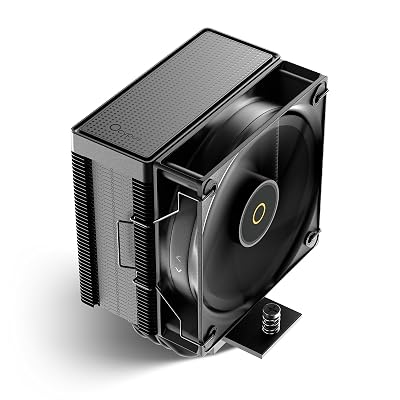
Ocypus
₹3,133

Thermal Grizzly
₹1,999
