
tinazhao
Amazon.in16 Jun 2020
Verified purchase
Nice style
Really nice design, size is great and convenient,match very well with my office Read more Read less

Out of stock · Seller 2.5★ · 10-day returns · Warranty Policy
Sold by Trendora Global
We may earn a commission when you buy through these links. It never changes the price or the order.
DudScore
Mixed signals. Compare before you buy.
Early score: few reviewsToday's price against the prices it has sold for.
From 171 days of our own price history, across stores.
₹8,520
Out of stock at our last check
The nearest alternatives in this category and price range.
 Prime Desk for, 75cm Height Engineered Wood Office Workstation Laptop, Gaming, Study Work from Home Table for Hostel, Reception Office Easy DIY Assembly UrbanTeak 4₹10,199DudScore +10
 LIAN LI O11 Vision-M Compact Micro-ATX PC Case - White Panoramic 3-Sided Tempered Glass Showcase, Dual Chamber, 360mm Radiator Support, Pre-Installed 140mm Fan, Anti-Sag GPU Bracket - O11VMW₹8,259₹261 cheaper
 Casio CT-S200 Casiotone 61-Key Portable Keyboard Black₹8,536DudScore +9
Ratings on stores (4,355)Reviews on Whydud (5)
Customer rating
4.0out of 5
4,355 ratings across stores
| 5★ | 58% | |
|---|---|---|
| 4★ | 15% | |
| 3★ | 11% | |
| 2★ | 6% | |
| 1★ | 10% |
100% verified purchases
tinazhao
Amazon.in16 Jun 2020
Really nice design, size is great and convenient,match very well with my office Read more Read less
James
Amazon.in11 Apr 2020
I originally gave a 1-star review entitled: "Do not buy this product". Review below. I decided to spend some time trying to figure out why it seemed to be a fail and I figured it out. If you're using a MAC, you may need to adjust a setting to avoid the kind of fail that I was facing in my original review below. After you connect the keyboard and mouse, click on keyboard under system preferences. from there click on change keyboard type. It will ask you to depress the key just to the right of the shift key. In this case, it's the page down key...that's okay... depress it 2-3 times and a pop-up will tell you that it doesn't recognize the keyboard and will ask you to select 1 of three types. select the bottom one which is the standard English American keyboard. Good Luck! "Many of the keys don:t output what they are supposed to. See that colon in my first sentence? that:s what you get when you try to enter an apostrophe. The delete key doesn:t do anything. To get an @ symbol, you need to type the *open bracket* key. Clearly the quote key will give you an asterisk. To get a carrot, you have to enter an ampersand. To get that pesky comma, you have to enter the ampersand.All that said, 1 through 0 and a to z are just fine. Great job Feniox. I get that you get what you pay for and if it only lasts for 6 months, but I expect the keys to work as marked right out of the box. Terrible, just terrible." Read more Read less
Amazon Customer
Amazon.in20 Feb 2021
The keyboard works fine, but the mouse is incredibly stiff. Click and hold takes quite a bit of effort. Read more Read less
Lauren Baker
Amazon.in21 Oct 2020
If you're used to higher quality products, turn around now and stick with what you're used to. I'm saving you the trouble of ordering this, returning, and going back to your OG brand. If you're currently using off-brand and doing light office work (email, web browsing, no gaming, no design, etc) then keep reading. I had a logitech keyboard and mouse and wanted to update the look in my office setup. I thought these were cute and affordable. Separately they are fine, but they don't work well together as a set. I believe this is because the dongle is switching back and forth, creating a lag. Keyboard - Looks great, and very nice size (not too large). Yes, this is light and cheap-feeling, but it worked well and looks cute. The keys make a cheap clicking sound - this didn't bother me (until I switched back to my regular keyboard). Mouse - the mouse has a very nice feel to it - fits well in my hand and a solid weight (I have small hands, which is worth noting). This has a very similar to the apple mouse - with an added track wheel. While I was using it was fine, but when I went back to my logitech I definitely noticed a difference in responsiveness. Together - the largest issue with these, and why I returned, is when you are using both (which you'd obviously want to do) the mouse doesn't work for the first couple of seconds after typing. To me it appears the dongle (there is one included that works for both) takes a second or two to switch from receiving input from the keyboard to receiving input from the mouse. This is BEYOND frustrating for me - and rendered unusable. Bottom line - you can't use together, and if you're purchasing for just one you can find less expensive purchasing on its own. Read more Read less
OttrFrnds
Amazon.in15 May 2019
I was looking for a compact keyboard, but also one with a numeric keypad. This keyboard fell into that category. I use both Windows and MacOS and this felt like it was more designed for Windows than MacOS. They should have just swap out that Mac command key symbol for a Windows icon to make it less confusing. The mouse that came with the keyboard was a bonus, but a bit too flat looking in my opinion. The manual is pretty cool in that it’s the shape of the box, and laid flat out. None of that unfolding and flipping through nonsense. It could use some grammar editing though. Keyboard Pros: -The keys are a bit bouncy. Reminds me of the MacBook Air’s keyboard. -They are a bit quieter than some other keyboards. It definitely doesn’t have the ‘click, clack’ sound. It sounds more like a ‘thud’. -Love how they done away with the section that use to exclusively place the arrow keys (insert, delete, home, end, page up, page down, etc) -Looks classy with the brushed metal (like an Apple product) -The back side of the keyboard has a non-slip matte like texture so you can grab and go with it without it accidentally sliding out of your hands. -Really thin. Keyboard Cons: -Doesn’t caress your fingers like Lenovo’s ThinkPad keyboards. -Not as quiet as Lenovo or Razer Laptop keyboards. -Could use another Ctrl key to the right side of the board (near the right shift key) -I really wish the media keys were separated from the function keys. I just want to push a button without worrying about hitting a Fn button or squinting at the small icons to see which function button does what. The keyboard would have space if they shorten the height of the space bar row and use the empty section at the top of the keyboard. -If only the keys were backlit, this would be awesome in the dark. -The LED for the numeric and caps button only light on when you’re typing. I guess that’s a battery saving feature but come on! They are LEDs. Plus I don’t know when the power LED will ever turn on. Maybe when it’s on low battery. -BackSpace key too small. Plus the Delete key is placed right next to it. The problem comes when I’m deleting text. I might accidentally hit the other key and it deletes the other way. Mouse Pros: -Color and trim matches with the keyboard. -Mouse clicks are quiet -The DPI button under the mouse wheel has three levels. That’s pretty cool considering standard mice do not have that function. Mouse Cons: -The plate that goes under the mouse to cover the battery is clipped on by just two top notches, but it still works. I don’t even know how it stays attached with just two prongs. The bottom part just just flaps open (see side mouse picture) but surprisingly, it stays put when in use. -It takes two AA batteries to work. I often seen mice work with one. Makes the mouse a bit heavy. -I feel like I have to press the mouse harder than the other Logitech mice I have. -The mouse wheel doesn’t have the back/forward function when you press on the side of the wheel at an angle. Read more Read less
 Prime Desk for, 75cm Height Engineered Wood Office Workstation Laptop, Gaming, Study Work from Home Table for Hostel, Reception Office Easy DIY Assembly UrbanTeak 4₹10,19964 · Good buy
 LIAN LI O11 Vision-M Compact Micro-ATX PC Case - White Panoramic 3-Sided Tempered Glass Showcase, Dual Chamber, 360mm Radiator Support, Pre-Installed 140mm Fan, Anti-Sag GPU Bracket - O11VMW₹8,25963 · Good buy
 Casio CT-S200 Casiotone 61-Key Portable Keyboard Black₹8,53663 · Good buy
 QUASIO Large Print Backlit Keyboard with 7-Color Backlit,Wired USB Lighted Computer Keyboards Oversize Letters Keys Easy to See,Illuminated Keyboard for PC,Laptop,Windows Desktop₹7,21863 · Good buy
 75 Mechanical Gaming Keyboard with Hot Swappable RGB Backlit Custom Knob,Gasket Mount USB Wired Keyboard,82 Red Black Linear Red Switch Keys₹7,65263 · Good buy
 Pxin Aero Anti-Glare Anti-Bluelight Screen Guard compatible with 35 Inch 219 Monitor BLUVLightBlock Anti Glare Anti Bluelight UV Protect Eye Protection₹8,04963 · Good buy
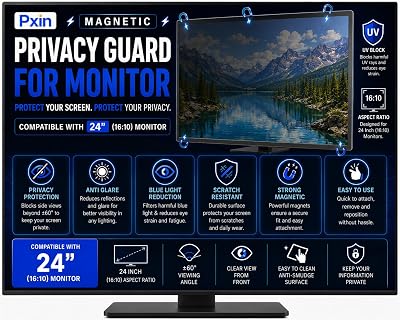 Pxin monitor Magnetic Privacy Guard compatible with 24 Inch 1610 Monitor Privacy screen protector Anti Glare Anti Spy Screen Reduces blue light Eye Protection₹7,62963 · Good buy
 Source One Premium Tilted Keyboard Stand for Ergonomic,Clear Acrylic₹10,14463 · Good buy64 · Good buy
CREATIVE QUBE
₹10,199
 63 · Good buy
 63 · Good buy
Pxin
₹6,579
 63 · Good buy
Pxin
₹6,199
63 · Good buy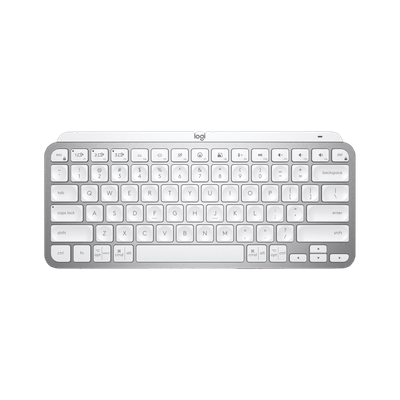 63 · Good buy63 · Good buy
