


Nisarga Information technology Solutions Pvt Ltd
Sells on Amazon.in
4.5(18 ratings)
7 products tracked
Nisarga Information technology Solutions Pvt Ltd sells on Amazon.in. Whydud tracks 7 of its listings with price history and reviews. Rated 4.5 out of 5 by 18 buyers on Amazon.in.
Products from this seller
 54 · Think twice
 50 · Think twice
Ricoh
Pick Roller Set Of 2 Rollers 250K Shts for FI-5750C,FI-6670 and FI-6 Scanners D36132
₹17,648

Fujitsu
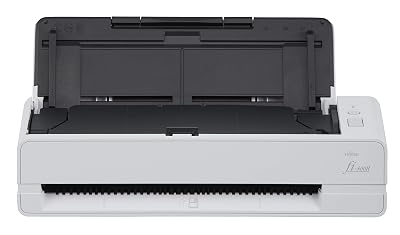
Fujitsu fi-7460 Sheetfed Scanner - 600 dpi Optical - 24-bit Color - 10-bit Grayscale - 60 - 60 - Duplex Scanning - USB
₹2,24,900


What buyers say
Reviews of products this seller sells; the ones bought from this seller first.
- Love it
Works as perfect as expected. A-1 Read more Read less
Rejean · Verified purchase · May 2023
- Great product
First of all, this product is very expensive and primarily made for business use and not necessarily for residential use. I bought the ix-1600 for archiving thousands of pages of technical manuals from my 40 years of work. But I had thousands of pages of 11x17 schematics and diagrams that needed to be scanned and the only reasonably priced product was the fi-7460. The fi-7460 was also able to scan several hundred 11x34, 11x30, 11x28 sheets of diagrams that I also had. Yes, sheets as long as 34 inches and the fi-7460 would scan even longer sheets. The fi-7460 is also very good at scanning brochures and various other unusual sizes and lengths. The great thing is all of these documents are scanned into a PDF formatted file and the quality of the scanned image is fantastic. It will allow me to physically recycle several hundred pounds of paper, preserve very important past history of the company I worked for that no longer exists and finally remove a burden from my daughter of what to do with a room full of my past history.... that most likely would have just ended up in the dumpster. Maybe I will be able to re-sell this product when I have finished my project which will take about a year to complete rather than maybe 3 years using only a much cheaper product like a flatbed scanner. Thank you Fujitsu for a fine product. Read more Read less
tumbleweed · Verified purchase · Apr 2023
- Printet gave me issues. Didn't meet my expectations
I bought the scanner for work. It is not reliable. Every time i scan it gives me vertical lines on the pages. I have to delete 5 pages in order to get one good scan. It is a waist of my time. Read more Read less
Unknown · Verified purchase · Dec 2022
- Farbstichig
Gut zum Scannen von Büchern, Farbfotos gehen aber sehr ins Lilafarbstichige, eine Korrektur ist nicht möglich. Die Software halbwegs bedienungsfreundlich. Der Namenzusatz 4800 ist nicht nachvollziehbar, da er normalerweise für 4800 dpi Scanner angebracht wäre. Der Scanner hat 1200 dpi, ist auch so angegeben. Read more Read less
Wolf · Verified purchase · May 2020
- Was very excited to get this item but, when ...
Was very excited to get this item but, when i went out to car they do not go in flush. They stick out anout 3/4 inch. Do not buy, if ur looking for item to be flush with reat of car Read more Read less
Gene S. · Verified purchase · Aug 2018
- Low end product with inconsistent quality.
Ordered these as they are labeled as being made by Fujitsu, but clearly based on packaging and quality they aren't. We scan THOUSANDS of sheets of paper a day, and these literally fell apart almost instantly, with rubber shredding off like a cheap pencil eraser, leaving bits on the documents and in our scanners. The instructions that they came with are quite clearly bad photocopies of original documents. Save yourself the time and money and order from Fujitsu directly! Read more Read less
BrianTheSith · Verified purchase · Jun 2018
- Ordered these as the price was better than other sites
Needed replacement rollers for our scanner. Ordered these as the price was better than other sites. These worked well and resolved the scanning issue we were having. Read more Read less
Catherine77 · Verified purchase · Apr 2018
- Five Stars
Same as description. Read more Read less
Alexandre Rodrigues · Verified purchase · Mar 2018
- Replacing worn out rollers due to excessive scanning of records ...
Replacing worn out rollers due to excessive scanning of records. This was the cheapest way we could replace this part. Read more Read less
Cindy Williams · Verified purchase · Mar 2017
- Great scanner. Four stars because of the iffy software.
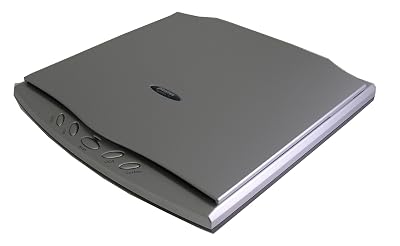
Update February 2022. After almost six years and thousands of scans later, the 4800 is still going strong. This is a great scanner but, I just upgraded to the Ver 7 software and that is a disaster. I won't get into all of it but, if you are a serious user who wants to make precise adjustments on your scans, dump the version 7 software and find Ver 6. Ver 6 has its quirks as I outline below but you'll be happier with it. Even if it cannot remember the last folder you saved to! The 4800 is still a great scanner but, the software is not so great. Now back to my original review from 6 years ago. Oh yes, it works fine on Windows 10. I originally purchased a Opticbook 3900 from another seller when I started my website because the 4800 was pricey and I also needed a large format scanner as well and spending nearly $800 apiece on the two scanners seemed a bit too much. However, after a couple of months using the 3900 I switched to the 4800 and it was money well spent. If only I bought it first I could have saved $250 for the 3900. I switched to the 4800 because it has a narrower edge than the 3900, 2mm for the 4800 vs 6mm for the 3900. For those of us who work in decimal that's about 1/10 (1/16") of an inch for the 4800 as compared to about .25" (1/4") for the 3900. This little bit helped scan some old catalogs and manuals without ruining the spine, at least in some cases not too badly. I use the scanner primarily for PDF creation. The scanner was easy to set up for Windows 7. It is pretty fast, not as fast as the 3900, about 7 seconds or so per page. Since I am scanning equipment manuals with schematics and illustrations, I use 300dpi and I am very happy with the results. There are 4 buttons on the front panel, 'Cancel", 'Color", 'Gray', and 'B/W'. They are handy but I had to tape over all but the 'Color' because when I am scanning quickly I found it was to easy to hit the wrong one. The unit comes with 3 software packages. Plustek Book Pavillion, Newsoft Presto! Pagemanager, and ABBYY FineReader. Since I use Adobe Acrobat Pro DC to assemble my PDFs I'll only comment on the Book Pavillion. It works well for scanning and is easy to use but for the following. First, the window is way too small for me. It only opens to about a quarter of the screen. The preview screen is even smaller, maybe a tenth of my 22" screen. If you are setting the scan area with the draggable window it is hard to see exactly where you are dragging too. And the lines that delineate the window look like they are one pixel wide and a kinda pale purple color, not very visible but I have learned to work with it. Also, you can set the page rotation, 90 degrees left or right 180 degrees on all, odd, or even scans. Really nice but sometimes in the middle of a scan you need to change the orientation and when you change the rotation it doesn't start from where you changed it, it goes back and looks at the beginning of whole scan process or 5 pages back or wherever it decides to. I haven't quite figured it out yet. Very annoying. Rotation should start with the page where you decided to change. Lastly, after a couple of hours of scanning, the crop you have set earlier will just change, no apparent reason, the scanner just decides that you would like it better if it now cut the top or bottom off the page. I haven't found a cure for this either other than shutting down and coming back later. This doesn't always happen and could be a fluke of my computer and conflicting software running at the same time, I just don't know. OK, after running down the software for its quirks, I really like this scanner. I have also used it for pictures and they look fine in Paint Shop Pro X9. If you need to scan books without destroying the spine, this is for you. 2mm puts you really close to the spine but be forewarned some books still need less. If you need a large format scanner, I recommend the Plustek OpticSlim 1180. Read more Read less
David Wigfield · Verified purchase · Oct 2016
- Five Stars
smooth transaction. splendid Read more Read less
Y. Koren · Verified purchase · Mar 2016